
432 Bridge: six music services in one 432Hz web player
432 Bridge (Music services) is a free page of the 432Hz Web Player, at 432hz.live/discover, where Spotify, YouTube, SoundCloud, Apple Music, Deezer and Tidal play in their official players and the free 432Hz Browser Extension retunes what you hear to 432Hz as it plays. Nothing is downloaded. It works in Chrome and Edge on a computer and on Android in Lemur Browser; without the extension, everything plays at standard 440Hz.
infoIn the web player this page is called Music services, and Services in the bottom bar. 432 Bridge is the connection that lets the extension tune it.
- check6 services, one player (YouTube Music links play too)
- checkTuned live by the free extension
- checkYour extension playlists on the web
- checkDesktop, and Android in Lemur
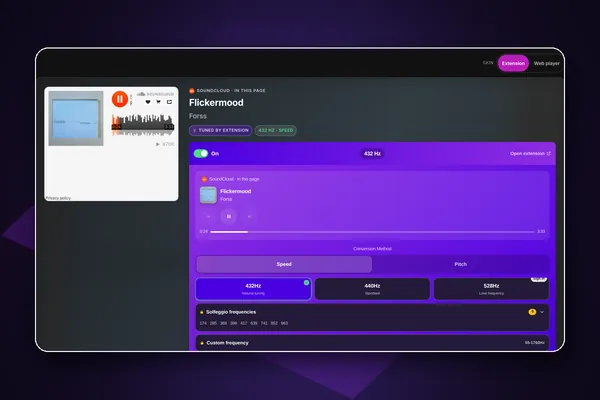
Key facts
| Where | 432hz.live/discover, the Music services page of the 432Hz Web Player |
|---|---|
| Services | Spotify, YouTube (YouTube Music links too), SoundCloud, Apple Music, Deezer, Tidal, in their official embeds |
| Price | Free. Nothing on this page needs web player Pro; the extension is free for 432Hz |
| Tunings | From the extension: 432 and 440Hz free; 528Hz with a free extension account; Solfeggio and custom 55 to 1760Hz with extension Pro |
| Method | Speed (about 1.8% slower at 432Hz) or Pitch (exact tempo, in Chrome and Edge, and on Android in Lemur; one click on the extension per tab) |
| Browsers | Chrome and Edge on a computer; Android in Lemur Browser. iPhone and iPad play the services untuned |
| Without the extension | Search and play everything at standard 440Hz |
| Full tracks | Set by each service. Spotify: full tracks when signed in on a computer, 30-second previews on phones and in Safari |
| Privacy | The page talks only to the extension. Service sign-in checks return yes or no, never tokens, cookies, names or emails |
| Extension version | 1.9.0, updated 9 October 2026 |
fact_check Facts checked 11 October 2026
workspace_premiumFree vs ProWhat is free in 432 Bridge and what Pro addsarrow_forwardWhat makes it different
The services' own players, retuned
Every song plays in the official embed of Spotify, YouTube, SoundCloud, Apple Music, Deezer or Tidal, never a scraped copy, and the extension retunes it as it plays. Each service's own rules decide full tracks or previews (for example, Spotify plays previews on phones). If Speed does not change the sound on a service, switch to Pitch.
One tuning, both ways
Pick 432Hz on the page and the extension switches too; change it in the extension and the page follows. The same goes for Speed or Pitch and for the power switch.
Your other tabs, from one page
On a computer, music playing in other tabs, such as Spotify's own web player, is listed under Playing in Your Other Tabs. Play, pause, skip or jump to that tab without hunting for it.
Your extension library on the web
Favorites and playlists you keep in the extension are saved to your 432 Player account. Sign in at 432hz.live to play, rename, reorder and edit them, with up to 1,000 songs per playlist, and the extension shows the same changes.
Honest about each service
The page tells you when a service limits you: Spotify plays 30-second previews in embeds on phones and in Safari, and Tidal cannot be searched from a web page, so you get an Open on Tidal row that runs your search on Tidal's own site.
How it works
- Step 1
Add the free extension
Install Ultimate 432Hz Converter from the Chrome Web Store in Chrome or Edge on a computer, or in Lemur Browser on Android.
- Step 2
Open 432 Bridge (Music services)
Go to 432hz.live/discover. The Extension Status card says Connected when the bridge is on.
- Step 3
Choose 432Hz and play
Pick 432Hz on the page (a new install starts at 440Hz), then search or paste a link. The song plays in its own player while the extension retunes it.
Features
One search box
Search Spotify, YouTube, SoundCloud, Deezer and Apple Music together, filter by service and sort by title, artist, length or year. It searches only when you press Search.
Paste any link
Spotify tracks, albums, playlists, episodes and artists, YouTube and YouTube Music videos and playlists, SoundCloud, Apple Music, Deezer and Tidal links all play here.
432 Player's buttons drive the music
Play, pause and seek from the web player's own controls for Spotify, YouTube and SoundCloud, and skip within YouTube playlists, SoundCloud sets and your queue. Apple Music, Deezer and Tidal keep their own buttons.
Now Playing, with lyrics
A full-screen Now Playing with artwork, the tuning chips, lyrics and artist info for the service track.
Speed or Pitch
Speed works right away and plays about 1.8% slower at 432Hz. Pitch keeps the tempo exact in Chrome and Edge after one click on the extension in that tab, a browser rule the page walks you through.
The extension's equalizer
With extension Pro, edit the extension's 10-band equalizer and presets from the web player's EQ panel.
Your Services card
See your Spotify, YouTube and Deezer sign-in status (Apple Music and Tidal show Unknown, and SoundCloud can too). The extension reports only yes or no and a plan level, never a password, token, cookie, name or email.
Sleep timer and media keys
For Spotify, YouTube and SoundCloud, the sleep timer pauses the service, and your keyboard or lock-screen media controls follow what is playing. For Apple Music, Deezer and Tidal this works only with the extension installed, when it recognises the player.
On Android
432 Bridge works the same way in Lemur Browser, tested by us: install the extension there, open 432hz.live/discover and choose 432Hz. Spotify plays 30-second previews on a phone, by Spotify's rule for its embedded player, so for whole songs open open.spotify.com in a Lemur tab (also tested); YouTube and SoundCloud have no such limit.
Who it is for
- personYou use more than one music service and want them in 432Hz in one place.
- personYou already use the 432Hz Browser Extension and want its playlists and controls on a bigger screen.
- personYou are on Android and want Spotify, YouTube or SoundCloud in 432Hz in a browser.
Built since 2013
432 Player came out on iPhone on 15 April 2013 (its App Store page is archived by the Internet Archive from February 2014) and on Android on 30 November 2014. It is discussed in peer-reviewed research: Ruth E. Rosenberg (University of Illinois Chicago), "Perfect Pitch: 432 Hz Music and the Promise of Frequency," Journal of Popular Music Studies 33(1), 2021.
info432Hz is a listening preference. Our apps are tools for enjoying music, not medical devices, and make no health claims.
Questions and answers
432 Bridge is the connection between the free 432Hz Browser Extension and the Music services page of the 432Hz Web Player at 432hz.live/discover. You play Spotify, YouTube, SoundCloud, Apple Music, Deezer or Tidal on that page, and the extension retunes what you hear to 432Hz: every service the extension can tune, 432 Bridge can tune. If Speed does not change the sound on a service, switch to Pitch.
Only for the tuning. Without it, you can still search and play every service on the page, at standard 440Hz. With the extension installed, the same songs play in 432Hz, and you can control music in your other tabs.
Yes. The Music services page is free and needs no account. The extension is free for 432Hz and 440Hz; a free extension account adds 528Hz, and extension Pro adds Solfeggio and custom frequencies. Signing in to 432 Player is only needed to see your extension favorites and playlists.
That is Spotify's rule for its embedded player, not ours. Spotify plays full tracks in embeds only when you are signed in to Spotify in a computer browser other than Safari. On phones and in Safari it plays 30-second previews, and the page offers Open in Spotify.
Yes, in Lemur Browser, which installs Chrome Web Store extensions. We tested it there: the extension connects to the page, and Pitch mode works after you open the extension once from the browser's Extensions menu. Chrome and Firefox for Android cannot install our extension, so there the page plays untuned.
Not for tuning. iPhone and iPad browsers cannot run our extension, so the services play at standard 440Hz there. On iPhone, 432 Player plays your own files in 432Hz and 432 Radio plays live radio in 432Hz.
No. The bridge needs the browser extension, so it runs in a browser tab at 432hz.live. In the 432 Player desktop and phone apps, music services play untuned.
Yes, with the extension. Music playing in your other browser tabs appears under Playing in Your Other Tabs, where you can play, pause, skip or switch to that tab. For full Spotify tracks on a computer, Spotify's own web player in a tab works too.
432 Bridge
Play Spotify, YouTube and four more services in the 432Hz Web Player, with the free extension for 432Hz.
Works well with
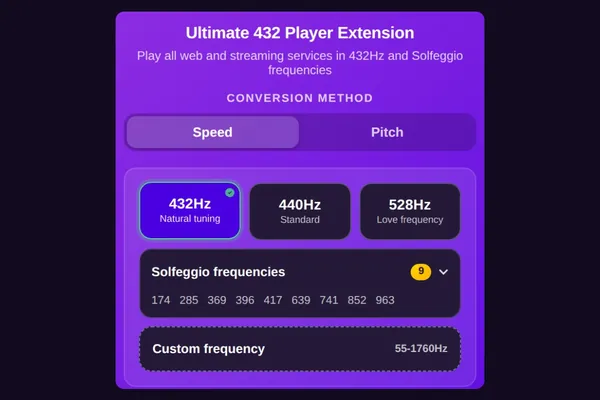 432Hz Browser Extensionarrow_forwardThe free extension that does the tuning. Needed for 432Hz here.
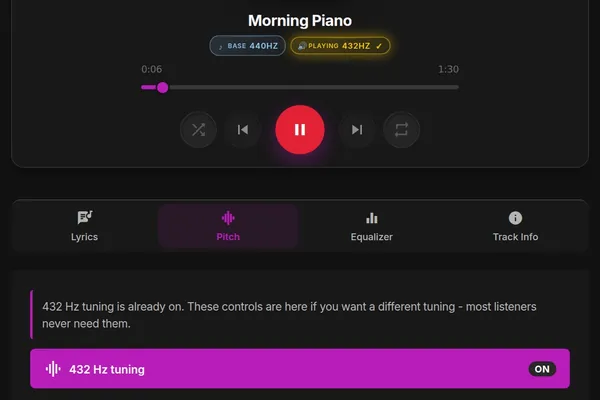 432Hz Web Playerarrow_forwardThe web player around it, for your own files and 30,000+ radio stations.
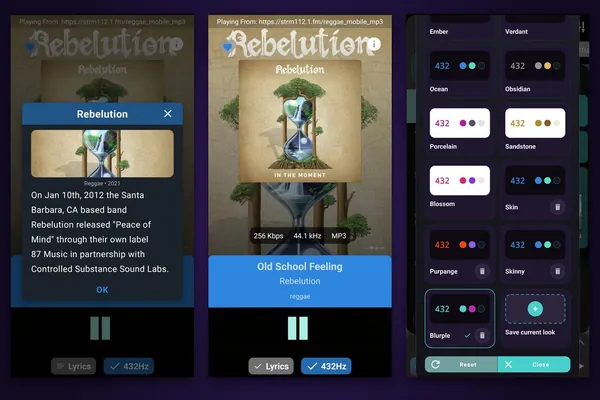 432 Radioarrow_forwardOn iPhone, where the bridge cannot tune, 432 Radio plays live radio in 432Hz.
Further reading
Updated 12 October 2026