How to listen to Tidal in 432Hz
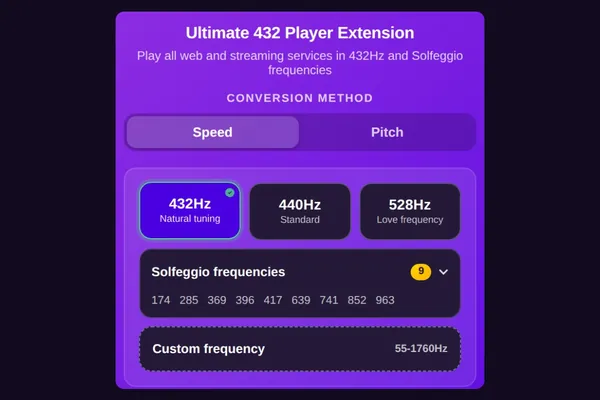
To listen to Tidal in 432Hz, sign in to Tidal's web player at tidal.com in Chrome or Edge with the free 432Hz Browser Extension and choose 432Hz from the extension's toolbar icon. The music is retuned as it plays. The TIDAL app on any device cannot be retuned, and Tidal downloads cannot be converted.
What works where
| computerComputer | Yes: tidal.com in Chrome or Edge, from the toolbar icon, with a subscription |
|---|---|
| androidAndroid | Not verified: try tidal.com in Lemur |
| phone_iphoneiPhone | No |
The quick answer
computerOn a computer
Add the free 432Hz Browser Extension to Chrome or Edge.
Go to tidal.com (listen.tidal.com now opens there), sign in with your TIDAL subscription and play an album.
Click the extension's 432 icon in your browser's toolbar and choose 432Hz.
lightbulbFor exact album timing, choose Pitch mode: the tempo stays as recorded.
Add the free extension to ChromeOr play it inside the 432Hz Web Player
Paste a Tidal track or album link at 432hz.live/discover and 432 Bridge plays it in Tidal's official player inside the 432Hz Web Player, retuned by the extension. Tidal cannot be searched from a web page, so search results offer an Open on Tidal row instead, and the embedded player keeps its own buttons. If Speed does not change the sound, switch to Pitch.
androidTidal in 432Hz on Android
Lemur Browser with the extension is the route to try. We have not tested Tidal there.
Install Lemur Browser from Google Play, then add Ultimate 432Hz Converter from the Chrome Web Store inside Lemur.
Open tidal.com in Lemur and sign in. If Tidal sends you to its app, try Desktop site.
Open Lemur's menu, then Extensions, then Ultimate 432Hz Converter, and choose 432Hz. If Speed changes nothing, choose Pitch.
- reportTidal's web player on Android browsers is not verified by us. If it does not play, a Tidal link in 432 Bridge may play a preview or the whole track, depending on Tidal's player.
- reportThe TIDAL Android app cannot be retuned.
phone_iphoneOn iPhone and iPad
Neither the TIDAL app nor tidal.com in Safari can be retuned on iPhone or iPad.
iPhone and iPad browsers cannot run our extension, so no browser route exists there.
For 432Hz on iPhone, 432 Player plays your own music files and 432 Radio plays live radio.
Speed or Pitch on Tidal
Tidal's web player may use protected (DRM) playback. Start with Speed, the default, about 1.8% slower at 432Hz. If the sound does not change, switch to Pitch: it retunes what the tab outputs and keeps the tempo exact, after one click on the extension in that tab. Pitch shifting is real-time processing at 44.1kHz in the extension, so it is not bit-perfect playback of Tidal's original stream.
Questions and answers
No retuning can be bit-perfect, because changing the pitch means processing the sound. The extension does it live in your browser with a pitch engine, and the Studio engine (extension Pro) is our highest-quality option. Turn the extension off and Tidal plays untouched.
No. Our 432Hz Converter cannot open Tidal's offline downloads; it takes DRM-free files you own. If you bought a DRM-free FLAC or MP3 elsewhere, the converter can make a 432Hz copy of that file. For Tidal itself, retune tidal.com live with the extension.
To stream on tidal.com, you need to sign in with your TIDAL account. The extension is free for 432Hz and needs no account.
Not directly. Tidal does not offer a search a web page can use, so 432 Bridge shows an Open on Tidal row. Copy a track or album link from Tidal and paste it into 432 Bridge to play it there.
On iPhone, no. On Android, you can try tidal.com in Lemur Browser with the extension; we have not verified that Tidal plays there.