
How to listen to SoundCloud in 432Hz
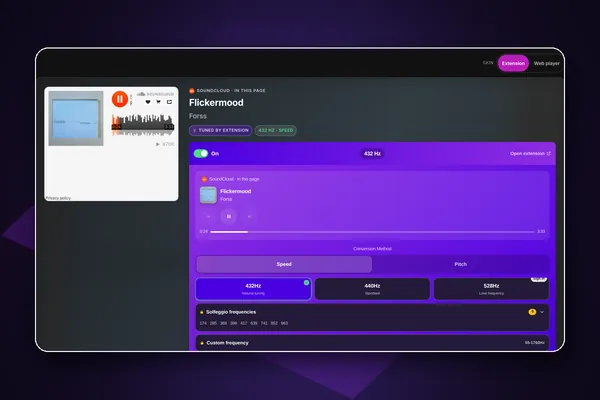
To listen to SoundCloud in 432Hz, open soundcloud.com in Chrome or Edge with the free 432Hz Browser Extension and choose 432Hz on the 432 button it adds to SoundCloud's play bar. Any track, set or mix is retuned while it plays, with no SoundCloud account needed. In 432 Bridge, SoundCloud plays in full inside the 432Hz Web Player, retuned the same way.
What works where
| computerComputer | Yes: button on SoundCloud's play bar in Chrome or Edge |
|---|---|
| androidAndroid | Should work in Lemur (tested by us through 432 Bridge) |
| phone_iphoneiPhone | No (downloads the artist allows can go into 432 Player) |
The quick answer
computerOn a computer
Add the free 432Hz Browser Extension to Chrome or Edge.
Open a track or set on soundcloud.com and press play.
Click the 432 button on the play bar at the bottom of the page and choose 432Hz.
lightbulbLong DJ mixes and live sets stay at 432Hz from start to end; the tuning belongs to the tab, not the track.
Add the free extension to ChromeOr play it inside the 432Hz Web Player
Search SoundCloud or paste a track or set link at 432hz.live/discover and 432 Bridge plays it in SoundCloud's official player with full playback, retuned by the extension and controlled by the web player's own buttons. The player shows Tuned by extension and 432 Hz while it plays.
androidSoundCloud in 432Hz on Android
Use Lemur Browser with the extension, or play SoundCloud links in 432 Bridge. The SoundCloud app cannot be retuned.
Install Lemur Browser from Google Play, then add Ultimate 432Hz Converter from the Chrome Web Store inside Lemur.
Open soundcloud.com in Lemur. Phones get SoundCloud's mobile site, which has no 432 button; tune from the menu, or turn on Desktop site to get the button.
Open Lemur's menu, then Extensions, then Ultimate 432Hz Converter, and choose 432Hz.
- reportOn a phone, 432 Bridge is often the smoothest path for SoundCloud: open 432hz.live/discover in Lemur and paste the track link.
- reportWhether SoundCloud's mobile site plays every track in the browser, or asks for the app, can change; we have not tested every case.
phone_iphoneOn iPhone and iPad
SoundCloud cannot be retuned on iPhone or iPad. If an artist offers a track as a free download, that file is yours to play in 432Hz in 432 Player for iPhone, or to convert with our 432Hz Converter.
iPhone and iPad browsers cannot run our extension, so no browser route exists there.
Speed or Pitch on SoundCloud
SoundCloud streams through a standard web audio player, so Speed retunes it directly: about 1.8% slower at 432Hz, which most listeners do not notice on ambient or downtempo tracks but DJs will on a beat-matched mix. For mixes, choose Pitch to keep the BPM exact, after one click on the extension in that tab.
tuneSome tracks are for SoundCloud Go+ subscribers, and others hear a preview of them; that is SoundCloud's rule, in its own site and in 432 Bridge.
Questions and answers
No. The extension retunes anything soundcloud.com plays, signed in or not, and SoundCloud plays in 432 Bridge without signing in.
Only if the artist offers a download on SoundCloud. Then the file is yours, and our 432Hz Converter can make a 432Hz MP3 or WAV of it. We do not download streams.
In Speed mode, yes, by about 1.8%, so a 124 BPM mix plays at roughly 122 BPM. In Pitch mode the BPM stays exactly the same and only the pitch moves.
Usually, yes. The extension runs in every tab and frame with HTML5 audio, so a SoundCloud widget on a label or artist site is retuned too. Embedded players have no 432 button; choose 432Hz from the toolbar icon.
Yes. The search on 432hz.live/discover includes SoundCloud alongside Spotify, YouTube, Deezer and Apple Music, and you can filter results to SoundCloud only.