Spotify, YouTube and more in 432Hz on Android
Use the free 432Hz extension in Vivaldi or Titanium, on the music sites or in 432 Bridge.
- Spotify
- YouTube
- YouTube Music
- Apple Music
- SoundCloud
- Tidal
- Deezer
To play Spotify, YouTube and other music sites in 432Hz on Android, install Vivaldi (or Titanium) from Google Play, turn on Desktop site, add the free 432Hz Browser Extension (Ultimate 432Hz Converter) from the Chrome Web Store, and pick 432Hz on the music site or in 432 Bridge at 432hz.live/discover. Chrome for Android cannot install extensions; Vivaldi and Titanium can, and we tested ours in both on Spotify and YouTube, with Speed and Pitch. The Spotify and YouTube apps themselves cannot be retuned.
Works with
Each link opens the Android section for that service: what works, and what we have not been able to test.
What you'll need
- smartphone An Android phone
- travel_explore Vivaldi or Titanium, free on Google Play; both install Chrome Web Store extensions
- extension The free Ultimate 432Hz Converter extension
Vivaldi, step by step
Vivaldi 8.2 and later install Chrome Web Store extensions on Android. We tested ours in it: Speed and Pitch, on Spotify and YouTube, and the 432 button on the player.
Used Lemur or Kiwi before? Lemur's October 2026 update stopped Pitch mode: it says the tab is already being used, even on a fresh install. Speed still works there. Kiwi Browser is no longer maintained and has left Google Play. For Pitch, use Vivaldi or Titanium.
Install Vivaldi Browser from Google Play. You need version 8.2 or later.
Open Vivaldi's menu and turn on Desktop site. Keep it on: Vivaldi installs extensions only in that mode, and music sites then show the 432 button.
Open the Chrome Web Store at chromewebstore.google.com and search for "Ultimate 432Hz Converter", or use the link below.
Tap Add to Vivaldi, then Add extension.
Pin it to the address bar: tap the Extensions button there, tap the three dots next to Ultimate 432Hz Converter, then Pin to toolbar.
Open a music site such as open.spotify.com or youtube.com and start a track.
Tap the extension's icon, pick Speed or Pitch, then tap 432Hz. A new install starts at 440Hz, so this step matters. You can also use the 432 button on the player.
Titanium, step by step
Titanium Browser is a free, open-source browser built on Vanadium, from the GrapheneOS project. It was called Helium before. We tested the extension in it with the same results as in Vivaldi.
Install Titanium Browser from Google Play.
Open the menu and turn on Desktop site.
Open the Chrome Web Store at chromewebstore.google.com and search for "Ultimate 432Hz Converter", or use the link below.
Tap Add to Chrome, then confirm.
Open Titanium's extensions menu and pin Ultimate 432Hz Converter to the address bar, so it is one tap away.
Open a music site such as open.spotify.com or youtube.com and start a track.
Tap the extension's icon, pick Speed or Pitch, then tap 432Hz. You can also use the 432 button on the player.
432 Bridge: the easiest way to start
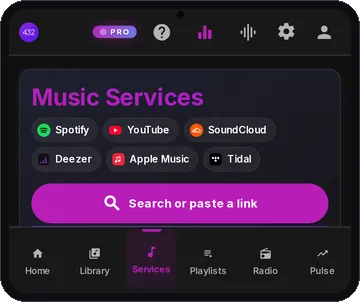
432 Bridge is the Music services page of the 432Hz Web Player at 432hz.live/discover. In Vivaldi or Titanium with the extension, search or paste a link from Spotify, YouTube (YouTube Music links too), SoundCloud, Apple Music, Deezer or Tidal, and it plays in that service's own player, retuned to 432Hz. It runs on the same extension we tested in both browsers, so it should work the same way.
With the extension installed in Vivaldi or Titanium, open 432hz.live/discover.
Check that the Extension Status card says Connected, then choose 432Hz on the page.
Search or paste a link and press play. For Pitch mode, the page shows a one-time step: tap the extension's icon, choose Pitch, then come back.
infoOn a phone, Spotify plays 30-second previews inside 432 Bridge, whatever your account; that is Spotify's rule for its embedded player. For whole Spotify songs, open open.spotify.com in a Vivaldi or Titanium tab, which we tested with the extension. YouTube and SoundCloud have no such limit, so they are the easiest services to start with in 432 Bridge.
Other browsers
Other Android browsers also install Chrome Web Store extensions. We have not tested ours in them, so treat these as worth a try. Speed should work wherever the extension runs; Pitch depends on the browser.
- help_outline Quetta Browser says it supports Chrome Web Store and Edge Add-ons extensions. Install the extension the same way as in Vivaldi.
- help_outline Microsoft Edge Canary installs extensions only by an Edge Add-ons ID from its developer options. Our extension is not on Edge Add-ons, so we do not recommend this route.
Tips and troubleshooting
- check_circle Speed or Pitch? Speed, the default, plays about 1.8% slower. Pitch keeps the original tempo.
- check_circle Use the website, not the app. The extension only affects audio playing inside the browser tab, so open the service's website in Vivaldi or Titanium, or use 432 Bridge, rather than the Spotify or YouTube app.
- check_circle No 432 button on the player? Check that Desktop site is on: mobile sites do not show it. You can always tune from the extension's icon.
- check_circle Keep the tab playing in the foreground. Some sites pause audio in background tabs.
- check_circle No difference? Make sure the extension is on and set to 432Hz, not 440Hz. The shift is subtle, about a third of a semitone, so headphones help.
- check_circle Real-time processing uses a little more battery than normal playback.
Frequencies you can choose
432Hz and 440Hz are free with no account. 528Hz (applied as A=444) is free with an extension account. The other tones need extension Pro, with free 60-second previews.
Frequently asked questions
Can I play Spotify or YouTube in 432Hz on Android?
Yes, in a browser. Install Vivaldi or Titanium, turn on Desktop site, add the free Ultimate 432Hz Converter extension, and open the service's website or play it in 432 Bridge at 432hz.live/discover. We tested Spotify's web player (open.spotify.com) and YouTube in both browsers, with Speed and Pitch. Inside 432 Bridge on a phone, Spotify plays only 30-second previews. The Spotify and YouTube apps cannot be retuned.
Which Android browser should I use?
Vivaldi, version 8.2 or later, or Titanium. Both install extensions from the Chrome Web Store, and we tested ours in both: Speed and Pitch, on Spotify and YouTube, and the 432 button on the player. Chrome and Firefox for Android cannot install our extension.
Why turn on Desktop site?
Vivaldi installs extensions only while Desktop site is on, and we used it in Titanium too. With it on, music sites load their full pages, where the 432 button appears.
What about Lemur or Kiwi Browser?
Lemur's October 2026 update stopped Pitch mode: it says the tab is already being used, even on a fresh install with one tab. Speed still works there. Kiwi Browser stopped being maintained in January 2025 and is no longer on Google Play. For Pitch, use Vivaldi or Titanium.
Is the extension free?
Yes, for 432Hz. 432Hz and 440Hz are free with no account, and a free account adds 528Hz. Pro adds Solfeggio tones, custom frequencies, the Studio engine and the full Audio Lab.
Does it download or change my music?
No. It retunes the audio live as it plays in the tab. Nothing is downloaded, re-encoded or saved.
Is there an easier way to get 432Hz on my phone?
Yes. The 432 Player Android app retunes your own library instantly (plus a free radio tab with 30,000+ stations), 432 Radio plays live stations in 432Hz, and the web player streams in 432Hz with nothing to install.
Get 432Hz everywhere
For streaming sites, the extension in Vivaldi or Titanium. For your own music and radio, the 432 Player app, with no browser setup at all.